

Frequently Asked Questions
Q: Can I make the pipeline run in the background?
Section titled “Q: Can I make the pipeline run in the background?”A. Yes
Nextflow handles job submissions and supervises the running jobs. The Nextflow process must run until the pipeline is finished.
The Nextflow -bg flag launches Nextflow in the background, detached from your terminal so that the workflow does not stop if you log out of your session. The logs are saved to a file.
Alternatively, you can use screen / tmux or similar tool to create a detached session which you can log back into at a later time.
Some HPC setups also allow you to run nextflow within a cluster job submitted your job scheduler (from where it submits more jobs).
Q: The module RECONST_FRF crashed. It can not find a minimum number of voxels to identify as single-fiber voxels in automatic estimation
Section titled “Q: The module RECONST_FRF crashed. It can not find a minimum number of voxels to identify as single-fiber voxels in automatic estimation”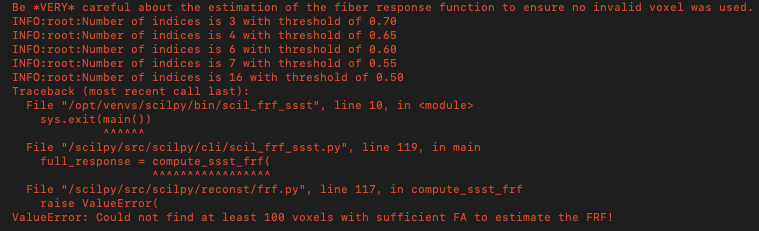
This is an example illustrated a failure of the FRF module caused by an insufficient number of voxels identified as single-fiber voxels during an automatic estimation. In this case, only 16 voxels were detected. By default, the minimum required number of voxels is 100 for this pipeline, depending on the resolution or the quality of the data, a higher threshold may be necessary.
To lower this requirement, you can specify a small value using --nvox_min=X option in your command line.
For this exemple:
--nvox_min=10.